Homework - W.A. Wichers

Yukako Shimada
Moderator
edited April 2015 in Animatronic Control Systems - Arduino Programming Basics with David Covarrubias
Ok, so at first I was thinking about building a gun with a nozzle that opens before it shoots some sort of laser. Whilst looking for a solution for opening the nozzle, I found these really cool iris diaphragms. Then I got the idea to use two of them as "eyelids" and put some kind of controllable LED behind them.
This reminded me of Bubo, the mechanical owl from "Clash of the Titans" So a new idea was born: build an owl with servo-controlled iris diaphragms for eyelids and glowing eyes.
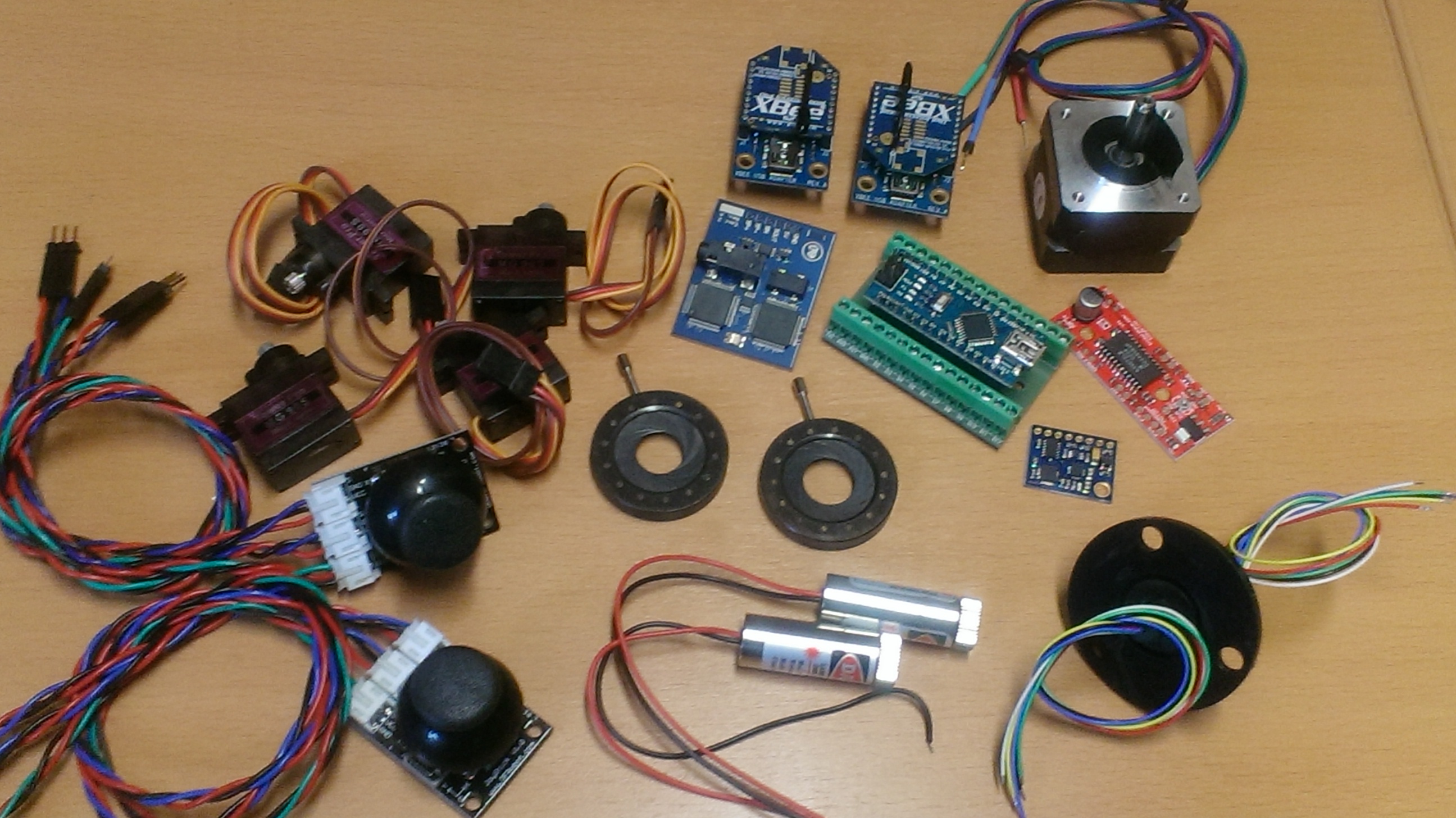
Whilst rummaging through the stuff I still had lying around, I found a slip ring. It has six wires going through it and I thought it would be cool if the owl's head could spin limitlessly. I still had a steppermotor and driver, so I'm thinking about using that for spinning the head. I'll have to see how I'm going to attach the motor to the head. Maybe I can print a ring gear and pinion, otherwise I'll have to see if I can find a pre-made one (they're expensive though, so rather not)
For the LED's, I ordered a pair of neopixel-jewels (they're almost the same size as the opening in the diaphragms)
I have some extra servo's, so if there's enough space in the head, I could try to animate the beak also.
As I'm not sure if the slip ring will allow me to use it for serial communication, I've got a pair of XBees for backup.
I also found a text-to speach module that I'd like to incorporate, which should give it a nice mechanical, "robot-like" voice.
Finally, I found some joysticks, which I could use for controlling the figure.
So it looks like I have most of the stuff I need (I ordered the diaphragms immediately when I found them and they came in yesterday, the LED's should come in hopefully tomorrow) The only thing missing is the owl figure itself.
I actually found a Bubo-prop, but if I'm not mistaken, it's made out of foam-latex, so I'm not going to be able to use it as-is.
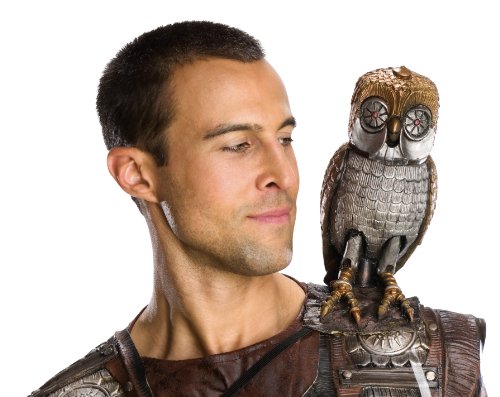
I ordered it anyway, because I'd like to try and 3D scan it, so I can make a 3D print. The nice thing about that would be that I'll be able to match the size of the eyes exactly to the size of the diaphragms. The only thing is, that my 3D printer is down at the moment. So I'm hoping to get it fixed in the next couple of days.
Other stuff like breadboards, hook-up wire, prototype boards, buttons etc. I should have plenty of. For now, I'm just going to use a bench power supply for power and a set of computer speakers for sound. Maybe later on, I'll exchange those with a battery and an internal speaker and amplifier.
So that's the basic idea. I hope to be able to actually build it (no idea how much time we'll be allowed to put it all together). Otherwise, getting the electronics to work will be a nice challenge by itself.
This reminded me of Bubo, the mechanical owl from "Clash of the Titans" So a new idea was born: build an owl with servo-controlled iris diaphragms for eyelids and glowing eyes.
Whilst rummaging through the stuff I still had lying around, I found a slip ring. It has six wires going through it and I thought it would be cool if the owl's head could spin limitlessly. I still had a steppermotor and driver, so I'm thinking about using that for spinning the head. I'll have to see how I'm going to attach the motor to the head. Maybe I can print a ring gear and pinion, otherwise I'll have to see if I can find a pre-made one (they're expensive though, so rather not)
For the LED's, I ordered a pair of neopixel-jewels (they're almost the same size as the opening in the diaphragms)
I have some extra servo's, so if there's enough space in the head, I could try to animate the beak also.
As I'm not sure if the slip ring will allow me to use it for serial communication, I've got a pair of XBees for backup.
I also found a text-to speach module that I'd like to incorporate, which should give it a nice mechanical, "robot-like" voice.
Finally, I found some joysticks, which I could use for controlling the figure.
So it looks like I have most of the stuff I need (I ordered the diaphragms immediately when I found them and they came in yesterday, the LED's should come in hopefully tomorrow) The only thing missing is the owl figure itself.
I actually found a Bubo-prop, but if I'm not mistaken, it's made out of foam-latex, so I'm not going to be able to use it as-is.
I ordered it anyway, because I'd like to try and 3D scan it, so I can make a 3D print. The nice thing about that would be that I'll be able to match the size of the eyes exactly to the size of the diaphragms. The only thing is, that my 3D printer is down at the moment. So I'm hoping to get it fixed in the next couple of days.
Other stuff like breadboards, hook-up wire, prototype boards, buttons etc. I should have plenty of. For now, I'm just going to use a bench power supply for power and a set of computer speakers for sound. Maybe later on, I'll exchange those with a battery and an internal speaker and amplifier.
So that's the basic idea. I hope to be able to actually build it (no idea how much time we'll be allowed to put it all together). Otherwise, getting the electronics to work will be a nice challenge by itself.
This image has been resized to fit in the page. Click to enlarge.
1
Comments
-
My code so far:
// for servos
#include <Adafruit_TiCoServo.h>
#include <known_16bit_timers.h>
Adafruit_TiCoServo servo1;
Adafruit_TiCoServo servo2;
int potpin1 = A0;
int potpin2 = A1;
int newval1, oldval1;
int newval2, oldval2;
//for Neopixels
#include <Adafruit_NeoPixel.h>
#include <avr/power.h>
#define PIN1 6
#define PIN2 7
#define NUMPIXELS 7
Adafruit_NeoPixel pixels1 = Adafruit_NeoPixel(NUMPIXELS, PIN1, NEO_GRB + NEO_KHZ800);
Adafruit_NeoPixel pixels2 = Adafruit_NeoPixel(NUMPIXELS, PIN2, NEO_GRB + NEO_KHZ800);
int delayval = 0;
// for Emic2
#include <SoftwareSerial.h>
#define rxPin 11 // connects to Emic 2's SOUT pin
#define txPin 12 // connects to Emic 2's SIN pin
#define ledPin 13
#define buttonPin1 2
#define buttonPin2 3
SoftwareSerial emicSerial = SoftwareSerial(rxPin, txPin);
void setup()
{
Serial.begin(9600);
// for servos
servo1.attach(9);
servo2.attach(10);
// for Neopixels
pixels1.begin();
pixels2.begin();
// for Emic2
pinMode(ledPin, OUTPUT);
pinMode(buttonPin1, INPUT);
pinMode(buttonPin2, INPUT);
pinMode(rxPin, INPUT);
pinMode(txPin, OUTPUT);
emicSerial.begin(9600);
digitalWrite(ledPin, LOW);
emicSerial.print('\n');
while (emicSerial.read() != ':');
delay(10);
emicSerial.flush();
}
void loop()
{
moveServos();
lightPixels();
playAudio();
}
void moveServos() {
newval1 = analogRead(potpin1);
newval1 = map(newval1, 506, 1023, 10, 169);
if (newval1 < (oldval1-1) || newval1 > (oldval1+1)){
servo1.write(newval1);
Serial.print("Servo 1 ");
Serial.println(newval1);
oldval1=newval1;
}
newval2 = analogRead(potpin2);
newval2 = map(newval2, 506, 1023, 10, 169);
if (newval2 < (oldval2-1) || newval2 > (oldval2+1)){
servo2.write(newval2);
Serial.print("Servo 2 ");
Serial.println(newval2);
oldval2=newval2;
}
delay(25);
}
void lightPixels() {
int lightInput1 = analogRead(potpin1);
int lightInputA = map(lightInput1, 506, 1023, 0, 150);
lightInputA = constrain(lightInputA, 0, 150);
int lightInputB = map(lightInput1, 606, 1023, 0, 10);
lightInputB = constrain(lightInputB, 0, 10);
pixels1.setPixelColor(0, pixels1.Color(lightInputA,0,0));
for(int i=1; i<NUMPIXELS; i++){
pixels1.setPixelColor(i, pixels1.Color(lightInputB,0,0));
}
int lightInput2 = analogRead(potpin2);
int lightInputC = map(lightInput2, 506, 1023, 0, 150);
lightInputC = constrain(lightInputC, 0, 150);
int lightInputD = map(lightInput2, 606, 1023, 0, 10);
lightInputD = constrain(lightInputD, 0, 10);lightInputB = constrain(lightInputB, 0, 10);
pixels2.setPixelColor(0, pixels2.Color(lightInputC,0,0));
for(int i=1; i<NUMPIXELS; i++){
pixels2.setPixelColor(i, pixels2.Color(lightInputD,0,0));
}
pixels1.show();
pixels2.show();
delay(delayval);
}
void playAudio() {
int joystickButton1 = digitalRead(buttonPin1);
if(joystickButton1 == 0) {
Serial.println("Button 1 pressed");
emicSerial.print('S');
emicSerial.print("Hello. My name is Bubo. I'm the owl from the movie clash of the tytans.");
emicSerial.print('\n');
digitalWrite(ledPin, HIGH);
while (emicSerial.read() != ':');
digitalWrite(ledPin, LOW);
}
int joystickButton2 = digitalRead(buttonPin2);
if(joystickButton2 == 0) {
Serial.println("Button 2 pressed");
emicSerial.print("D1\n");
digitalWrite(ledPin, HIGH);
while (emicSerial.read() != ':');
digitalWrite(ledPin, LOW);
}
}
0 -
Did a quick design for a temporary mechanism. I'll try to get it printed and maybe actually get something working. Now back to programming!

0 -
Electronics are working, although there's still some finetuning to do.
The servo and neopixel functions are still creating some lag. I had to set the steppermotor to full steps to get it up to speed.
Also, I havent't gotten the audio fragments to trigger randomly.
I'd like to get all the functions working randomly and be able to have them overruled by live input, but that will probably have to wait.
Mechanically, I have to do some adaptations to the gears I bought and I'll have to make some rollers, as the ones I printed didn't come out very nicely. I'll also have to come up with a way to connect the servo's to the diaphragms.
So, we're getting there, but still enough to do. https://www.youtube.com/watch?v=QtfO__N774E
1 -
Code1:
// for servos
#include <Adafruit_TiCoServo.h> //special library that lets servo's work together with neopixels
#include <known_16bit_timers.h>
Adafruit_TiCoServo servo1; //servo 1
Adafruit_TiCoServo servo2; //servo 2
int potpin1 = A0; //potentiometer for servo 1 position
int potpin2 = A1; //potentiometer for servo 2 position
int newval1; //for storing new value potentiometer 1 / servo 1
int oldval1; //for storing current value potentiometer 1 / servo 1
int newval2; //for storing new value potentiometer 2 / servo 2
int oldval2; //for storing current value potentiometer 2 / servo 2
//for Neopixels
#include <Adafruit_NeoPixel.h> //library for controlling neopixels
#include <avr/power.h>
#define PIN1 6 //pin attached to neopixel jewel 1
#define PIN2 7 //pin attached to neopixel jewel 2
#define NUMPIXELS 7 //number of pixels in each neopixel jewel
Adafruit_NeoPixel pixels1 = Adafruit_NeoPixel(NUMPIXELS, PIN1, NEO_GRB + NEO_KHZ800);
Adafruit_NeoPixel pixels2 = Adafruit_NeoPixel(NUMPIXELS, PIN2, NEO_GRB + NEO_KHZ800);
// for Emic2
#define audioEffectPin1 11 //this pin sends the signal to the second arduino to play a sentence or song
#define buttonPin1 2 //when button is pushed, a sentence or song plays
// for steppermotor
#define stepPin 3 //step pin
#define dirPin 4 //direction pin
#define clockwiseButtonPin A2 //when button is pushed, motor turns clockwise
#define counterClockwiseButtonPin A3 //when button is pushed, motor turns counterclockwise
int stepperSpeed = 100; //delay between step pulses. Higher number means motor spins faster
void setup()
{
// for servos
servo1.attach(9); //servo 1 attaches to pin 9
servo2.attach(10); //servo 2 attaches to pin 10
// for Neopixels
pixels1.begin(); //initiate neopixel jewel 1
pixels2.begin(); //initiate neopixel jewel 2
// for Emic2
pinMode(buttonPin1, INPUT);
digitalWrite(buttonPin1, HIGH);
pinMode(audioEffectPin1, OUTPUT);
// for steppermotor
pinMode(stepPin, OUTPUT);
pinMode(dirPin, OUTPUT);
pinMode(clockwiseButtonPin, INPUT);
pinMode(counterClockwiseButtonPin, INPUT);
digitalWrite(stepPin, LOW);
digitalWrite(dirPin, LOW);
digitalWrite(counterClockwiseButtonPin, HIGH);
digitalWrite(clockwiseButtonPin, HIGH);
}
void loop()
{
moveServos();
lightPixels();
playAudio();
moveStepper();
}
void moveServos() {
//reads the value of a potentiometer and adjusts the position of a servo accordingly
newval1 = analogRead(potpin1); //reads the value of potentiometer 1
newval1 = map(newval1, 0, 1023, 600, 2000); //maps the value of potentiometer 1 to microseconds
if (newval1 < (oldval1 - 5) || newval1 > (oldval1 + 5)) { //prevents jitter. if the change in value is too small, it is ignored
servo1.write(newval1); //sends the new value to servo 1
oldval1 = newval1; //updates the current position of the servo
}
//same as above, but for servo 2
newval2 = analogRead(potpin2);
newval2 = map(newval2, 0, 1023, 600, 2000);
if (newval2 < (oldval2 - 5) || newval2 > (oldval2 + 5)) {
servo2.write(newval2);
oldval2 = newval2;
}
//delay(5);
}
void lightPixels() {
//reads the value of a potentiometer and adjusts the brightness of an led accordingly
//written for neopixel jewel, which consits of a ring of 6 led's, with one led in the center.
//when the value of the potentiometer increases, first the center pixel lights up, then the other 6 follow.
int lightInput1 = analogRead(potpin1); //reads the value of potentiometer 1
int lightInputA = map(lightInput1, 0, 1023, 0, 150); //maps value to brightness for pixel 0
lightInputA = constrain(lightInputA, 0, 150); //makes sure the value can never be lower or higher than the desired values
int lightInputB = map(lightInput1, 250, 1023, 0, 25); //maps value to brightness for pixels 1-6
lightInputB = constrain(lightInputB, 0, 25); //makes sure the value can never be lower or higher than the desired values
pixels1.setPixelColor(0, pixels1.Color(lightInputA, 0, 0)); //sets colour and brightness for pixel 0
for (int i = 1; i < NUMPIXELS; i++) {
pixels1.setPixelColor(i, pixels1.Color(lightInputB, 0, 0)); //sets colour and brightness for pixels 1-6
}
//same as above, but for neopixel 2
int lightInput2 = analogRead(potpin2);
int lightInputC = map(lightInput2, 0, 1023, 0, 150);
lightInputC = constrain(lightInputC, 0, 150);
int lightInputD = map(lightInput2, 250, 1023, 0, 25);
lightInputD = constrain(lightInputD, 0, 25);
pixels2.setPixelColor(0, pixels2.Color(lightInputC, 0, 0));
for (int i = 1; i < NUMPIXELS; i++) {
pixels2.setPixelColor(i, pixels2.Color(lightInputD, 0, 0));
}
pixels1.show();
pixels2.show();
}
void playAudio() {
//reads the value of a button.
//if the button is pressed, pin 11 is set high. This pin is connected to another arduino, that plays a entence or song if it detects that the pin is high
int audioButton1 = digitalRead(buttonPin1);
if (audioButton1 == 0) {
digitalWrite(audioEffectPin1, HIGH);
delay(500); //delay, so the other arduino notices the state change, even if it's busy when the signal is given (has to be changed to work with millis)
digitalWrite(audioEffectPin1, LOW);
}
}
void moveStepper() {
//spins a steppermotor when a button is pressed. One button makes it spin clockwise, the other one makes it spin countercokwise
int leftButton = digitalRead(clockwiseButtonPin); //reads the state of the button for clockwise rotation
int rightButton = digitalRead(counterClockwiseButtonPin); //reads the state of the button for counterclockwise rotation
if (leftButton == 0 && rightButton == 1) { //if the button for clockwise rotation is pressed and the button for counterclockwise rotation isn't...
digitalWrite(dirPin, LOW); //set the direction pin to low (= spin clockwise)
digitalWrite(stepPin, HIGH); //enable motor (= spin motor)
delayMicroseconds(stepperSpeed); //pause for the set time (should be changed to work with millis) longer pause = motor spins slower
digitalWrite(stepPin, LOW); //disable motor
delayMicroseconds(stepperSpeed); ////pause for the set time (should be changed to work with millis) longer pause = motor spins slower
}
//same as above, but for counterclockwise rotation
else if (leftButton == 1 && rightButton == 0) {
digitalWrite(dirPin, HIGH);
digitalWrite(stepPin, HIGH);
delayMicroseconds(stepperSpeed);
digitalWrite(stepPin, LOW);
delayMicroseconds(stepperSpeed);
}
}
0 -
Code 2:
#include <TrueRandom.h>
// for timer
#include <Event.h> //library for handling millis
#include <Timer.h>
int period1 = 10000;
Timer speakText;
// for Emic2
#include <SoftwareSerial.h> //library that makes a second port available for serial communication with the EMIC2
#include <SD.h> // Needed by the EMIC2 library, though not utilized in this example
#include <EMIC2.h> //library for the Emic2
#define rxPin 11 // connects to Emic 2's SOUT pin
#define txPin 12 // connects to Emic 2's SIN pin
#define buttonPin1 3 //pin attached to second arduino. when pin is set high by other arduina, a sound is played
SoftwareSerial emicSerial = SoftwareSerial(rxPin, txPin);
EMIC2 emic; // Creates an instance of the EMIC2 library
//SoftwareSerial emicSerial = SoftwareSerial(rxPin, txPin); //opens up the second serial port and sets the tx and rx pins
String sentence[]={"__ My name is Bubo", "I'm the owl from the movie __clash of the __tytans", "My creator is called Cyril", "__Cyril taught __ me how to speak", "__Daivid taught __Cyril how to program", "__Matt likes to tease Daivid"}; //possible sentences that can be spoken
String nextSentence; //holds the next sentence to be played
int totalSentences = 6; //total number of sentences available
void setup()
{
// for timer
speakText.every(period1, playRandomAudio); //initiates the function playRandomAudio every 10 seconds (=period1)
// for Emic2
emicSerial.begin(9600);
emic.begin(rxPin, txPin); //opens up the second serial port and sets the tx and rx pins
emic.setVolume(10); //sets the desired volume
pinMode(buttonPin1, INPUT);
pinMode(rxPin, INPUT);
pinMode(txPin, OUTPUT);
}
void loop()
{
speakText.update(); //checks if it's time to run the playRandomAudio function
playAudio(); //runs the playAudio function
}
void playRandomAudio() {
nextSentence=sentence[TrueRandom.random(totalSentences)]; //selects a random sentence out of the total available sentences
emic.setVoice(1); //sets a voice (9 choices: 0 - 8)
emic.speak(nextSentence); //play the random selected sentence
}
void playAudio() {
int trackButton1 = digitalRead(buttonPin1); //read the state of the pushbutton connected to pin 3
if(trackButton1 == 1) { //if the button is pushed
emicSerial.print("D1\n"); //play the preconfigured example
}
}
0 -
I've connected the servo's and the neopixels to the slipring, so the platform can now rotate continuously. The cabling has been tidied up a bit and everything seems to be working. I'm currently printing a new top plate, as the openings for the servo horns were a bit too narrow. Once that is finished, I can connect the servo's to the diaphragms and the mechanism will be finished.
The code is working, but I'd still like to build some more randomness into it. That will probably have to wait untill monday.
Code1:
// for servos
#include <Adafruit_TiCoServo.h> //special library that lets servo's work together with neopixels
#include <known_16bit_timers.h>
Adafruit_TiCoServo servo1; //servo 1
Adafruit_TiCoServo servo2; //servo 2
int potpin1 = A0; //potentiometer for servo 1 position
int potpin2 = A1; //potentiometer for servo 2 position
int newval1; //for storing new value potentiometer 1 / servo 1
int oldval1; //for storing current value potentiometer 1 / servo 1
int newval2; //for storing new value potentiometer 2 / servo 2
int oldval2; //for storing current value potentiometer 2 / servo 2
//for Neopixels
#include <Adafruit_NeoPixel.h> //library for controlling neopixels
#include <avr/power.h>
#define PIN1 7 //pin attached to neopixel jewel 1
#define PIN2 6 //pin attached to neopixel jewel 2
#define NUMPIXELS 7 //number of pixels in each neopixel jewel
Adafruit_NeoPixel pixels1 = Adafruit_NeoPixel(NUMPIXELS, PIN1, NEO_GRB + NEO_KHZ800);
Adafruit_NeoPixel pixels2 = Adafruit_NeoPixel(NUMPIXELS, PIN2, NEO_GRB + NEO_KHZ800);
// for Emic2
#define audioEffectPin1 11 //this pin sends the signal to the second arduino to play a sentence or song
#define buttonPin1 2 //when button is pushed, a sentence or song plays
// for steppermotor
#define stepPin 3 //step pin
#define dirPin 4 //direction pin
#define clockwiseButtonPin A2 //when button is pushed, motor turns clockwise
#define counterClockwiseButtonPin A3 //when button is pushed, motor turns counterclockwise
int stepperSpeed = 100; //delay between step pulses. Higher number means motor spins faster
void setup()
{
// for servos
servo1.attach(9); //servo 1 attaches to pin 9
servo2.attach(10); //servo 2 attaches to pin 10
// for Neopixels
pixels1.begin(); //initiate neopixel jewel 1
pixels2.begin(); //initiate neopixel jewel 2
// for Emic2
pinMode(buttonPin1, INPUT);
digitalWrite(buttonPin1, HIGH);
pinMode(audioEffectPin1, OUTPUT);
// for steppermotor
pinMode(stepPin, OUTPUT);
pinMode(dirPin, OUTPUT);
pinMode(clockwiseButtonPin, INPUT);
pinMode(counterClockwiseButtonPin, INPUT);
digitalWrite(stepPin, LOW);
digitalWrite(dirPin, LOW);
digitalWrite(counterClockwiseButtonPin, HIGH);
digitalWrite(clockwiseButtonPin, HIGH);
}
void loop()
{
moveServos();
lightPixels();
playAudio();
moveStepper();
}
void moveServos() {
//reads the value of a potentiometer and adjusts the position of a servo accordingly
newval1 = analogRead(potpin1); //reads the value of potentiometer 1
newval1 = map(newval1, 0, 1023, 600, 2000); //maps the value of potentiometer 1 to microseconds
if (newval1 < (oldval1 - 5) || newval1 > (oldval1 + 5)) { //prevents jitter. if the change in value is too small, it is ignored
servo1.write(newval1); //sends the new value to servo 1
oldval1 = newval1; //updates the current position of the servo
}
//same as above, but for servo 2
newval2 = analogRead(potpin2);
newval2 = map(newval2, 0, 1023, 600, 2000);
if (newval2 < (oldval2 - 5) || newval2 > (oldval2 + 5)) {
servo2.write(newval2);
oldval2 = newval2;
}
//delay(5);
}
void lightPixels() {
//reads the value of a potentiometer and adjusts the brightness of an led accordingly
//written for neopixel jewel, which consits of a ring of 6 led's, with one led in the center.
//when the value of the potentiometer increases, first the center pixel lights up, then the other 6 follow.
int lightInput1 = analogRead(potpin1); //reads the value of potentiometer 1
int lightInputA = map(lightInput1, 0, 1023, 0, 150); //maps value to brightness for pixel 0
lightInputA = constrain(lightInputA, 0, 150); //makes sure the value can never be lower or higher than the desired values
int lightInputB = map(lightInput1, 250, 1023, 0, 25); //maps value to brightness for pixels 1-6
lightInputB = constrain(lightInputB, 0, 25); //makes sure the value can never be lower or higher than the desired values
pixels1.setPixelColor(0, pixels1.Color(lightInputA, 0, 0)); //sets colour and brightness for pixel 0
for (int i = 1; i < NUMPIXELS; i++) {
pixels1.setPixelColor(i, pixels1.Color(lightInputB, 0, 0)); //sets colour and brightness for pixels 1-6
}
//same as above, but for neopixel 2
int lightInput2 = analogRead(potpin2);
int lightInputC = map(lightInput2, 0, 1023, 0, 150);
lightInputC = constrain(lightInputC, 0, 150);
int lightInputD = map(lightInput2, 250, 1023, 0, 25);
lightInputD = constrain(lightInputD, 0, 25);
pixels2.setPixelColor(0, pixels2.Color(lightInputC, 0, 0));
for (int i = 1; i < NUMPIXELS; i++) {
pixels2.setPixelColor(i, pixels2.Color(lightInputD, 0, 0));
}
pixels1.show();
pixels2.show();
}
void playAudio() {
//reads the value of a button.
//if the button is pressed, pin 11 is set high. This pin is connected to another arduino, that plays a entence or song if it detects that the pin is high
int audioButton1 = digitalRead(buttonPin1);
if (audioButton1 == 0) {
digitalWrite(audioEffectPin1, HIGH);
delay(500); //delay, so the other arduino notices the state change, even if it's busy when the signal is given (has to be changed to work with millis)
digitalWrite(audioEffectPin1, LOW);
}
}
void moveStepper() {
//spins a steppermotor when a button is pressed. One button makes it spin clockwise, the other one makes it spin countercokwise
int leftButton = digitalRead(clockwiseButtonPin); //reads the state of the button for clockwise rotation
int rightButton = digitalRead(counterClockwiseButtonPin); //reads the state of the button for counterclockwise rotation
if (leftButton == 0 && rightButton == 1) { //if the button for clockwise rotation is pressed and the button for counterclockwise rotation isn't...
digitalWrite(dirPin, LOW); //set the direction pin to low (= spin clockwise)
digitalWrite(stepPin, HIGH); //enable motor (= spin motor)
delayMicroseconds(stepperSpeed); //pause for the set time (should be changed to work with millis) longer pause = motor spins slower
digitalWrite(stepPin, LOW); //disable motor
delayMicroseconds(stepperSpeed); ////pause for the set time (should be changed to work with millis) longer pause = motor spins slower
}
//same as above, but for counterclockwise rotation
else if (leftButton == 1 && rightButton == 0) {
digitalWrite(dirPin, HIGH);
digitalWrite(stepPin, HIGH);
delayMicroseconds(stepperSpeed);
digitalWrite(stepPin, LOW);
delayMicroseconds(stepperSpeed);
}
}
Code2:
#include <TrueRandom.h>
// for timer
#include <Event.h> //library for handling millis
#include <Timer.h>
int period1 = 10000;
Timer speakText;
// for Emic2
#include <SoftwareSerial.h> //library that makes a second port available for serial communication with the EMIC2
#include <SD.h> // Needed by the EMIC2 library, though not utilized in this example
#include <EMIC2.h> //library for the Emic2
#define rxPin 11 // connects to Emic 2's SOUT pin
#define txPin 12 // connects to Emic 2's SIN pin
#define buttonPin1 3 //pin attached to second arduino. when pin is set high by other arduina, a sound is played
SoftwareSerial emicSerial = SoftwareSerial(rxPin, txPin);
EMIC2 emic; // Creates an instance of the EMIC2 library
//SoftwareSerial emicSerial = SoftwareSerial(rxPin, txPin); //opens up the second serial port and sets the tx and rx pins
String sentence[]={"__ My name is Bubo", "I'm the owl from the movie __clash of the __tytans", "My creator is called Cyril", "__Cyril taught __ me how to speak", "__Daivid taught __Cyril how to program", "__Matt likes to tease Daivid"}; //possible sentences that can be spoken
String nextSentence; //holds the next sentence to be played
int totalSentences = 6; //total number of sentences available
void setup()
{
// for timer
speakText.every(period1, playRandomAudio); //initiates the function playRandomAudio every 10 seconds (=period1)
// for Emic2
emicSerial.begin(9600);
emic.begin(rxPin, txPin); //opens up the second serial port and sets the tx and rx pins
emic.setVolume(10); //sets the desired volume
pinMode(buttonPin1, INPUT);
pinMode(rxPin, INPUT);
pinMode(txPin, OUTPUT);
}
void loop()
{
speakText.update(); //checks if it's time to run the playRandomAudio function
playAudio(); //runs the playAudio function
}
void playRandomAudio() {
nextSentence=sentence[TrueRandom.random(totalSentences)]; //selects a random sentence out of the total available sentences
emic.setVoice(1); //sets a voice (9 choices: 0 - 8)
emic.speak(nextSentence); //play the random selected sentence
}
void playAudio() {
int trackButton1 = digitalRead(buttonPin1); //read the state of the pushbutton connected to pin 3
if(trackButton1 == 1) { //if the button is pushed
emicSerial.print("D1\n"); //play the preconfigured example
}
}
Video: https://www.youtube.com/watch?v=xmuktJ04b8o&feature=youtu.be
0 -
Another update.
I got the steppermotor and the audio working both through manual input and randomly. I didn't have time to do the servo's too, so at the moment they can only be controlled manually. https://www.youtube.com/watch?v=xvT7H120QyI
Code 1:
#include <TrueRandom.h> //library that generates true random numbers
// for servos
#include <Adafruit_TiCoServo.h> //special library that lets servo's work together with neopixels
#include <known_16bit_timers.h>
Adafruit_TiCoServo servo1; //servo 1
Adafruit_TiCoServo servo2; //servo 2
int potpin1 = A0; //potentiometer for servo 1 position
int potpin2 = A1; //potentiometer for servo 2 position
int newval1; //for storing new value potentiometer 1 / servo 1
int oldval1; //for storing current value potentiometer 1 / servo 1
int newval2; //for storing new value potentiometer 2 / servo 2
int oldval2; //for storing current value potentiometer 2 / servo 2
//for Neopixels
#include <Adafruit_NeoPixel.h> //library for controlling neopixels
#include <avr/power.h>
#define PIN1 7 //pin attached to neopixel jewel 1
#define PIN2 6 //pin attached to neopixel jewel 2
#define NUMPIXELS 7 //number of pixels in each neopixel jewel
Adafruit_NeoPixel pixels1 = Adafruit_NeoPixel(NUMPIXELS, PIN1, NEO_GRB + NEO_KHZ800); //sets values to neopixel jewel 1
Adafruit_NeoPixel pixels2 = Adafruit_NeoPixel(NUMPIXELS, PIN2, NEO_GRB + NEO_KHZ800); //sets values to neopixel jewel 2
// for Emic2
#define audioEffectPin1 11 //this pin sends the signal to the second arduino to play a sentence or song
#define buttonPin1 2 //when button is pushed, a sentence or song plays
long timerDelayAudioEffectPin; //timer for audiopin
int delayAudioEffectPin = 1000; //how long the pin is set high
// for steppermotor
int nextPosition; //position the steppermotor has to reach
int stepperDirection = 0; //direction in which the steppermotor is turning
boolean buttonPressed = false; //state of the buttons for manually controlling the steppermotor
long timerDelayBetweenRotations; //timer for random rotations
int delayBetweenRotations; //delay between random rotations (set by function setDelayBetweenRotations)
#define stepPin 3 //step pin
#define dirPin 4 //direction pin
#define clockwiseButtonPin A2 //when button is pushed, motor turns clockwise
#define counterClockwiseButtonPin A3 //when button is pushed, motor turns counterclockwise
#define stopPin A4 //when button is pushed, the motor doesn't turn at random
int stepperSpeed = 50; //delay between step pulses. Higher number means motor spins slower
void setup() {
// for servos
servo1.attach(9); //servo 1 attaches to pin 9
servo2.attach(10); //servo 2 attaches to pin 10
// for Neopixels
pixels1.begin(); //initiate neopixel jewel 1
pixels2.begin(); //initiate neopixel jewel 2
// for Emic2
pinMode(buttonPin1, INPUT);
digitalWrite(buttonPin1, HIGH);
pinMode(audioEffectPin1, OUTPUT);
timerDelayBetweenRotations = millis();
// for steppermotor
pinMode(stepPin, OUTPUT);
pinMode(dirPin, OUTPUT);
pinMode(clockwiseButtonPin, INPUT);
pinMode(counterClockwiseButtonPin, INPUT);
digitalWrite(stepPin, LOW);
digitalWrite(dirPin, LOW);
digitalWrite(counterClockwiseButtonPin, HIGH);
digitalWrite(clockwiseButtonPin, HIGH);
digitalWrite(stopPin, HIGH);
setNextPosition();
setDelayBetweenRotations();
timerDelayBetweenRotations = millis();
}
void loop()
{
moveServos();
lightPixels();
playAudio();
moveStepper();
}
void moveServos() {
//reads the value of a potentiometer and adjusts the position of a servo accordingly
newval1 = analogRead(potpin1); //reads the value of potentiometer 1
newval1 = map(newval1, 0, 1023, 600, 2000); //maps the value of potentiometer 1 to microseconds
if (newval1 < (oldval1 - 5) || newval1 > (oldval1 + 5)) { //prevents jitter. if the change in value is too small, it is ignored
servo1.write(newval1); //sends the new value to servo 1
oldval1 = newval1; //updates the current position of the servo
}
//same as above, but for servo 2
newval2 = analogRead(potpin2);
newval2 = map(newval2, 0, 1023, 600, 2000);
if (newval2 < (oldval2 - 5) || newval2 > (oldval2 + 5)) {
servo2.write(newval2);
oldval2 = newval2;
}
}
void lightPixels() {
//reads the value of a potentiometer and adjusts the brightness of an led accordingly
//written for neopixel jewel, which consits of a ring of 6 led's, with one led in the center.
//when the value of the potentiometer increases, first the center pixel lights up, then the other 6 follow.
int lightInput1 = analogRead(potpin1); //reads the value of potentiometer 1
int lightInputA = map(lightInput1, 0, 1023, 0, 30); //maps value to brightness for pixel 0
lightInputA = constrain(lightInputA, 0, 30); //makes sure the value can never be lower or higher than the desired values
int lightInputB = map(lightInput1, 600, 1023, 0, 15); //maps value to brightness for pixels 1-6
lightInputB = constrain(lightInputB, 0, 15); //makes sure the value can never be lower or higher than the desired values
pixels1.setPixelColor(0, pixels1.Color(lightInputA, 0, 0)); //sets colour and brightness for pixel 0
for (int i = 1; i < NUMPIXELS; i++) {
pixels1.setPixelColor(i, pixels1.Color(lightInputB, 0, 0)); //sets colour and brightness for pixels 1-6
}
//same as above, but for neopixel 2
int lightInput2 = analogRead(potpin2);
int lightInputC = map(lightInput2, 0, 1023, 0, 30);
lightInputC = constrain(lightInputC, 0, 30);
int lightInputD = map(lightInput2, 600, 1023, 0, 15);
lightInputD = constrain(lightInputD, 0, 15);
pixels2.setPixelColor(0, pixels2.Color(lightInputC, 0, 0));
for (int i = 1; i < NUMPIXELS; i++) {
pixels2.setPixelColor(i, pixels2.Color(lightInputD, 0, 0));
}
pixels1.show();
pixels2.show();
}
void playAudio() {
//reads the value of a button.
//if the button is pressed, pin 11 is set high. This pin is connected to another arduino, that plays a entence or song if it detects that the pin is high
int audioButton1 = digitalRead(buttonPin1);
if (audioButton1 == 0) {
digitalWrite(audioEffectPin1, HIGH);
if (millis() - timerDelayAudioEffectPin > delayAudioEffectPin) { //delay, so the other arduino notices the state change, even if it's busy when the signal is given
digitalWrite(audioEffectPin1, LOW);
timerDelayAudioEffectPin = millis();
}
}
}
void moveStepper() {
//spins a steppermotor when a button is pressed.
//One button makes it spin clockwise, the other one makes it spin countercokwise, the third one disables turning
int leftButton = digitalRead(clockwiseButtonPin); //reads the state of the button for clockwise rotation
int rightButton = digitalRead(counterClockwiseButtonPin); //reads the state of the button for counterclockwise rotation
int stopButton = digitalRead(stopPin); ////reads the state of the button that stops the random rotation
if (leftButton == 0 && rightButton == 1) { //if the button for clockwise rotation is pressed and the button for counterclockwise rotation isn't...
digitalWrite(dirPin, LOW); //set the direction pin to low (= spin clockwise)
digitalWrite(stepPin, HIGH); //enable motor (= spin motor)
delayMicroseconds(stepperSpeed); //pause for the set time (should be changed to work with millis) longer pause = motor spins slower
digitalWrite(stepPin, LOW); //disable motor
delayMicroseconds(stepperSpeed); //pause for the set time (should be changed to work with millis) longer pause = motor spins slower
buttonPressed = true; //sets the state of the button to true, so random turning is disabled
}
else if (leftButton == 1 && rightButton == 0) { //same as above, but for counterclockwise rotation
digitalWrite(dirPin, HIGH);
digitalWrite(stepPin, HIGH);
delayMicroseconds(stepperSpeed);
digitalWrite(stepPin, LOW);
delayMicroseconds(stepperSpeed);
buttonPressed = true;
}
else if (stopButton == 0) {
buttonPressed = true;
}
else {
buttonPressed = false;
}
//if none of the buttons is pressed, the steppermotor turns a random number of degrees clockwise,
//then waits for a random period, then turns a random number of degrees counterclockwise
if(buttonPressed == false) {
if (stepperDirection == 0) { //if the steppermotor is turning clockwise
if (nextPosition > 0) { //if the next position hasn't been reached yet
digitalWrite(dirPin, LOW); //set the direction pin to low (= spin clockwise)
digitalWrite(stepPin, HIGH); //enable motor (= spin motor)
delayMicroseconds(stepperSpeed); //pause for the set time (should be changed to work with millis) longer pause = motor spins slower
digitalWrite(stepPin, LOW); //disable motor
delayMicroseconds(stepperSpeed); ////pause for the set time (should be changed to work with millis) longer pause = motor spins slower
nextPosition--; //decreases the value of nextposition by 1
}
else if (nextPosition <= 0) { //when the steppermotor has reached it's position
if (millis() - timerDelayBetweenRotations > delayBetweenRotations) { //if the randomly set delaytime has been reached
stepperDirection = 1; //reverse the direction the steppermotor rotates in
setNextPosition(); //set new position for the steppermotor to reach
setDelayBetweenRotations(); //set new delaytime between rotations
timerDelayBetweenRotations = millis(); //reset timer for random rotations
}
}
}
//same as above, but for when the steppermotor is turning counterclockwise
if (stepperDirection == 1) {
if (nextPosition > 0) {
digitalWrite(dirPin, HIGH);
digitalWrite(stepPin, HIGH);
delayMicroseconds(stepperSpeed);
digitalWrite(stepPin, LOW);
delayMicroseconds(stepperSpeed);
nextPosition--;
}
if (nextPosition <= 0) {
if (millis() - timerDelayBetweenRotations > delayBetweenRotations) {
stepperDirection = 0;
setNextPosition();
setDelayBetweenRotations();
timerDelayBetweenRotations = millis();
}
}
}
}
}
//function for randomly determining the nxt position the steppermotor has to travel to
void setNextPosition() {
nextPosition = (TrueRandom.random(4, 50)*100);
}
//function for randomly determining the delay between rotations
void setDelayBetweenRotations() {
delayBetweenRotations = (TrueRandom.random(5, 10)*1000);
}
Code 2:
#include <TrueRandom.h> //library that generates true random numbers
//for triggering audio at random and at random times
long timerAudio; //timer for triggering audio at random
int timeToWaitAudio; //delay between random audio playback (set by function setNewWaitTime)
// for Emic2
#include <SoftwareSerial.h> //library that makes a second port available for serial communication with the EMIC2
#include <EMIC2.h> //library for the Emic2
#include <SD.h> // Needed by the EMIC2 library, though not utilized in this example
#define rxPin 11 // connects to Emic 2's SOUT pin
#define txPin 12 // connects to Emic 2's SIN pin
#define buttonPin1 3 //pin attached to second arduino. when pin is set high by other arduina, a sound is played
EMIC2 emic; // Creates an instance of the EMIC2 library
SoftwareSerial emicSerial = SoftwareSerial(rxPin, txPin); //opens up the second serial port and sets the tx and rx pins
String sentence[]={"__ My name is Bubo", "I'm the owl from the movie __clash of the __tytans", "My creator is called Cyril", "__Cyril taught __ me how to speak", "__Daivid taught __Cyril how to program", "__Matt likes to tease Daivid"}; //possible sentences that can be spoken
String nextSentence; //holds the next sentence to be played
int totalSentences = 6; //total number of sentences available
void setup()
{
//for triggering audio at random and at random times
timerAudio = millis();
setNewWaitTime();
// for Emic2
emicSerial.begin(9600); //sets speed of communication between arduino & Emic2
emic.begin(rxPin, txPin); //opens up the second serial port and sets the tx and rx pins
emic.setVolume(10); //sets the desired volume
pinMode(buttonPin1, INPUT);
pinMode(rxPin, INPUT);
pinMode(txPin, OUTPUT);
}
void loop()
{
playRandomAudio(); //runs the playRandomAudio function
playAudio(); //runs the playAudio function
}
void playRandomAudio() {
if (millis() - timerAudio > timeToWaitAudio) { //if the randomly set delaytime has been reached
nextSentence=sentence[TrueRandom.random(totalSentences)]; //selects a random sentence out of the total available sentences
emic.setVoice(1); //sets a voice (9 choices: 0 - 8)
emic.speak(nextSentence); //play the random selected sentence
setNewWaitTime(); //set a new delaytime between sentences
timerAudio = millis(); //reset timer for random audio
}
}
//function for randomly determining the time between audio playback
void setNewWaitTime() {
timeToWaitAudio = (TrueRandom.random(5, 20)*1000);
}
//function for playing a specific audio track when a button is pushed
void playAudio() {
int trackButton1 = digitalRead(buttonPin1); //read the state of the pushbutton connected to pin 3
if(trackButton1 == 1) { //if the button is pushed
emicSerial.print("D1\n"); //play the preconfigured example
}
}
0 -
Last update for this course.
I finally got all the functions to work as intended. If there is no manual input for a certain/random time, each function starts working autonomously, which means:
- diaphragms move to random positions, with random delays between movements.
- LED's behind diaphragms light up simultaniously.
- platform rotates to random positions, with random delays between movements.
- audiofragments are triggered randomly, with random delays between triggers.
The mechanism uses two arduino's because the code for the audio is blocking. By using a seperate arduino for the audio, all functions can be run simultaniously.
There's a slipring built into the platform, so it can turn without restrictions.
0 -
Here's the main code (everything but the audio):
#include <TrueRandom.h> //library that generates true random numbers
// for servos
#include <Adafruit_TiCoServo.h> //special library that lets servo's work together with neopixels
#include <known_16bit_timers.h>
Adafruit_TiCoServo servo1; //servo 1
Adafruit_TiCoServo servo2; //servo 2
int potpin1 = A0; //potentiometer for servo 1 position
int potpin2 = A1; //potentiometer for servo 2 position
int newval1; //for storing new value potentiometer 1 / servo 1
int oldval1; //for storing current value potentiometer 1 / servo 1
int newval2; //for storing new value potentiometer 2 / servo 2
int oldval2; //for storing current value potentiometer 2 / servo 2
long timerDelayBetweenServoMovements; //timer for determining time between random servomovements
int delayBetweenServoMovements; //time before next random movement is determined
long timerWaitBeforeRandom; //timer for determining time between manual movements and random movements
int waitBeforeRandom = 5000; //number of milliseconds to wait between last change of potmeter and start of random movements
int randomServoPosition; //holds the next randomly chosen servoposition
boolean potActive; //holds value of potentiometer activity
//for Neopixels
#include <Adafruit_NeoPixel.h> //library for controlling neopixels
#include <avr/power.h>
#define PIN1 7 //pin attached to data in of neopixel jewel 1
#define PIN2 6 //pin attached to data in of neopixel jewel 2
#define NUMPIXELS 7 //number of pixels in each neopixel jewel
Adafruit_NeoPixel pixels1 = Adafruit_NeoPixel(NUMPIXELS, PIN1, NEO_GRB + NEO_KHZ800); //sets values to neopixel jewel 1
Adafruit_NeoPixel pixels2 = Adafruit_NeoPixel(NUMPIXELS, PIN2, NEO_GRB + NEO_KHZ800); //sets values to neopixel jewel 2
// for Emic2
#define audioEffectPin1 11 //this pin sends the signal to the second arduino to play a sentence or song
#define buttonPin1 2 //when button is pushed, a sentence or song plays
long timerDelayAudioEffectPin; //timer for audiopin
int delayAudioEffectPin = 1000; //how long the pin is set high
// for steppermotor
int nextPosition; //position the steppermotor has to reach
int stepperDirection = 0; //direction in which the steppermotor is turning
boolean buttonPressed = false; //state of the buttons for manually controlling the steppermotor
long timerDelayBetweenRotations; //timer for random rotations
int delayBetweenRotations; //delay between random rotations (set by function setDelayBetweenRotations)
#define stepPin 3 //step pin
#define dirPin 4 //direction pin
#define clockwiseButtonPin A2 //when button is pushed, motor turns clockwise
#define counterClockwiseButtonPin A3 //when button is pushed, motor turns counterclockwise
#define stopPin A4 //when button is pushed, the motor doesn't turn at random
int stepperSpeed = 1000; //delay between step pulses. Higher number means motor spins slower
void setup() {
// for servos
servo1.attach(9); //servo 1 attaches to pin 9
servo2.attach(10); //servo 2 attaches to pin 10
timerDelayBetweenServoMovements = millis(); //starts "clock"
timerWaitBeforeRandom = millis(); //starts "clock"
setDelayBetweenServoMovements(); //sets first delay
setRandomServoPosition(); //sets first random servo position
// for Neopixels
pixels1.begin(); //initiate neopixel jewel 1
pixels2.begin(); //initiate neopixel jewel 2
// for Emic2
pinMode(buttonPin1, INPUT); //sets pin as input
digitalWrite(buttonPin1, HIGH); //pulls input high
pinMode(audioEffectPin1, OUTPUT); //sets pin as output
timerDelayBetweenRotations = millis(); //starts "clock"
// for steppermotor
pinMode(stepPin, OUTPUT); //sets pin as output
pinMode(dirPin, OUTPUT); //sets pin as output
pinMode(clockwiseButtonPin, INPUT); //sets pin as input
pinMode(counterClockwiseButtonPin, INPUT); //sets pin as input
digitalWrite(stepPin, LOW); //pulls pin low
digitalWrite(dirPin, LOW); //pulls pion low
digitalWrite(counterClockwiseButtonPin, HIGH); //pulls pin high
digitalWrite(clockwiseButtonPin, HIGH); //pulls pin high
digitalWrite(stopPin, HIGH); //pulls pin high
setNextPosition(); //sets first random position
setDelayBetweenRotations(); //sets first random delay
timerDelayBetweenRotations = millis(); //starts "clock"
}
void loop()
{
moveServos();
playAudio();
moveStepper();
}
void moveServos() {
//read the value of both potentiometers and convert them to microseconds
readPotOnePosition();
readPotTwoPosition();
//determine if the value of the potentiometers has changed (yes = true, no = false)
if (newval1 < (oldval1 -10) || newval1 > (oldval1 +10) || newval2 < (oldval2 -10) || newval2 > (oldval2 +10)) { //see if the value of potentiometer has changed
potActive = true;
}
else {
potActive = false;
}
switch (potActive) {
//if the value has changed, set the servo's to the new positions
case true: //if the value of the potentiometer has changed
timerWaitBeforeRandom = millis(); //reset the timer
servo1.write(newval1); // update the position of servo1
servo2.write(newval2); // update the position of servo1
oldval1 = newval1; //set current position
oldval2 = newval2; //set current position
lightPixels(); //lights up the led's according to the position of the servo"s
//if the value has not changed, wait for the set time
case false:
if ((millis() - timerWaitBeforeRandom) <= waitBeforeRandom) {
}
//if the value still hasn't changed, set the servo's to the randomly determined position
else {
servo1.write(randomServoPosition); //set servo 1 to randomly determined position
servo2.write(randomServoPosition); //set servo 1 to randomly determined position
lightRandomPixels();
//after a random delay, set a new random position and random delay
if ((millis() - timerDelayBetweenServoMovements) > delayBetweenServoMovements) { //if the random period between positionchanges has expired
setRandomServoPosition(); //set a new random position
setDelayBetweenServoMovements(); //set a new random period between positionchanges
timerDelayBetweenServoMovements = millis(); //reset the timer for the period between servo movements
}
}
}
}
//function for reading the value of potentiometer 1 and converting it to microseconds
void readPotOnePosition() {
newval1 = analogRead(potpin1); //reads the value of potentiometer 1
newval1 = map(newval1, 0, 1023, 600, 1900); //maps the value of potentiometer 1 to microseconds
}
//function for reading the value of potentiometer 2 and converting it to microseconds
void readPotTwoPosition() {
newval2 = analogRead(potpin2); //reads the value of potentiometer 1
newval2 = map(newval2, 0, 1023, 600, 1900); //maps the value of potentiometer 1 to microseconds
}
//function for randomly determining the next servo position
void setRandomServoPosition() {
randomServoPosition = (TrueRandom.random(3, 9) * 200);
}
//function for randomly determining the delay between servo movements
void setDelayBetweenServoMovements() {
delayBetweenServoMovements = (TrueRandom.random(5, 10)*1000);
}
void lightPixels() {
//takes the position of the servo's when in manual mode and adjusts the brightness of an led accordingly
//written for neopixel jewel, which consits of a ring of 6 led's, with one led in the center.
//when the value increases, first the center pixel lights up, then the other 6 follow.
//for NeoPxel 1
int lightInputA = map(newval1, 600, 1900, 1, 30); //maps value to brightness for pixel 0
lightInputA = constrain(lightInputA, 1, 30); //makes sure the value can never be lower or higher than the desired values
int lightInputB = map(newval1, 1050, 1900, 0, 15); //maps value to brightness for pixels 1-6
lightInputB = constrain(lightInputB, 0, 15); //makes sure the value can never be lower or higher than the desired values
pixels1.setPixelColor(0, pixels1.Color(lightInputA, 0, 0)); //sets colour and brightness for pixel 0
for (int i = 1; i < NUMPIXELS; i++) {
pixels1.setPixelColor(i, pixels1.Color(lightInputB, 0, 0)); //sets colour and brightness for pixels 1-6
}
//same as above, but for neopixel 2
int lightInputC = map(newval2, 600, 1900, 1, 30);
lightInputC = constrain(lightInputC, 1, 30);
int lightInputD = map(newval2, 1050, 1900, 0, 15);
lightInputD = constrain(lightInputD, 0, 15);
pixels2.setPixelColor(0, pixels2.Color(lightInputC, 0, 0));
for (int i = 1; i < NUMPIXELS; i++) {
pixels2.setPixelColor(i, pixels2.Color(lightInputD, 0, 0));
}
pixels1.show(); //sends the values to the led's
pixels2.show(); //sends the values to the led's
}
//takes the position of the servo's when in random mode and adjusts the brightness of an led accordingly
//written for neopixel jewel, which consits of a ring of 6 led's, with one led in the center.
//when the value increases, first the center pixel lights up, then the other 6 follow.
void lightRandomPixels() {
int lightInputA = map(randomServoPosition, 600, 1900, 1, 30); //maps value to brightness for pixel 0
lightInputA = constrain(lightInputA, 0, 30); //makes sure the value can never be lower or higher than the desired values
int lightInputB = map(randomServoPosition, 1350, 1900, 0, 15); //maps value to brightness for pixels 1-6
lightInputB = constrain(lightInputB, 0, 15); //makes sure the value can never be lower or higher than the desired values
pixels1.setPixelColor(0, pixels1.Color(lightInputA, 0, 0)); //sets colour and brightness for pixel 0
for (int i = 1; i < NUMPIXELS; i++) {
pixels1.setPixelColor(i, pixels1.Color(lightInputB, 0, 0)); //sets colour and brightness for pixels 1-6
}
pixels2.setPixelColor(0, pixels2.Color(lightInputA, 0, 0)); //sets colour and brightness for pixel 0
for (int i = 1; i < NUMPIXELS; i++) {
pixels2.setPixelColor(i, pixels2.Color(lightInputB, 0, 0)); //sets colour and brightness for pixels 1-6
}
pixels1.show(); //sends the values to the led's
pixels2.show(); //sends the values to the led's
}
void playAudio() {
//reads the value of a button.
//if the button is pressed, pin 11 is set high. This pin is connected to another arduino, that plays a entence or song if it detects that the pin is high
int audioButton1 = digitalRead(buttonPin1);
if (audioButton1 == 0) {
digitalWrite(audioEffectPin1, HIGH);
if (millis() - timerDelayAudioEffectPin > delayAudioEffectPin) { //delay, so the other arduino notices the state change, even if it's busy when the signal is given
digitalWrite(audioEffectPin1, LOW);
timerDelayAudioEffectPin = millis();
}
}
}
void moveStepper() {
//spins a steppermotor when a button is pressed.
//One button makes it spin clockwise, the other one makes it spin countercokwise, the third one disables turning
int leftButton = digitalRead(clockwiseButtonPin); //reads the state of the button for clockwise rotation
int rightButton = digitalRead(counterClockwiseButtonPin); //reads the state of the button for counterclockwise rotation
int stopButton = digitalRead(stopPin); ////reads the state of the button that stops the random rotation
if (leftButton == 0 && rightButton == 1) { //if the button for clockwise rotation is pressed and the button for counterclockwise rotation isn't...
digitalWrite(dirPin, LOW); //set the direction pin to low (= spin clockwise)
digitalWrite(stepPin, HIGH); //enable motor (= spin motor)
delayMicroseconds(stepperSpeed); //pause for the set time (should be changed to work with millis) longer pause = motor spins slower
digitalWrite(stepPin, LOW); //disable motor
delayMicroseconds(stepperSpeed); //pause for the set time (should be changed to work with millis) longer pause = motor spins slower
buttonPressed = true; //sets the state of the button to true, so random turning is disabled
}
else if (leftButton == 1 && rightButton == 0) { //same as above, but for counterclockwise rotation
digitalWrite(dirPin, HIGH);
digitalWrite(stepPin, HIGH);
delayMicroseconds(stepperSpeed);
digitalWrite(stepPin, LOW);
delayMicroseconds(stepperSpeed);
buttonPressed = true;
}
else if (stopButton == 0) {
buttonPressed = true;
}
else {
buttonPressed = false;
}
//if none of the buttons is pressed, the steppermotor turns a random number of degrees clockwise,
//then waits for a random period, then turns a random number of degrees counterclockwise
if(buttonPressed == false) {
if (stepperDirection == 0) { //if the steppermotor is turning clockwise
if (nextPosition > 0) { //if the next position hasn't been reached yet
digitalWrite(dirPin, LOW); //set the direction pin to low (= spin clockwise)
digitalWrite(stepPin, HIGH); //enable motor (= spin motor)
delayMicroseconds(stepperSpeed); //pause for the set time (should be changed to work with millis) longer pause = motor spins slower
digitalWrite(stepPin, LOW); //disable motor
delayMicroseconds(stepperSpeed); ////pause for the set time (should be changed to work with millis) longer pause = motor spins slower
nextPosition--; //decreases the value of nextposition by 1
}
else if (nextPosition <= 0) { //when the steppermotor has reached it's position
if (millis() - timerDelayBetweenRotations > delayBetweenRotations) { //if the randomly set delaytime has been reached
stepperDirection = 1; //reverse the direction the steppermotor rotates in
setNextPosition(); //set new position for the steppermotor to reach
setDelayBetweenRotations(); //set new delaytime between rotations
timerDelayBetweenRotations = millis(); //reset timer for random rotations
}
}
}
//same as above, but for when the steppermotor is turning counterclockwise
if (stepperDirection == 1) {
if (nextPosition > 0) {
digitalWrite(dirPin, HIGH);
digitalWrite(stepPin, HIGH);
delayMicroseconds(stepperSpeed);
digitalWrite(stepPin, LOW);
delayMicroseconds(stepperSpeed);
nextPosition--;
}
if (nextPosition <= 0) {
if (millis() - timerDelayBetweenRotations > delayBetweenRotations) {
stepperDirection = 0;
setNextPosition();
setDelayBetweenRotations();
timerDelayBetweenRotations = millis();
}
}
}
}
}
//function for randomly determining the next position the steppermotor has to travel to
void setNextPosition() {
nextPosition = (TrueRandom.random(4, 50)*100);
}
//function for randomly determining the delay between rotations
void setDelayBetweenRotations() {
delayBetweenRotations = (TrueRandom.random(5, 10)*1000);
}
0 -
And here's the code for the audio:
#include <TrueRandom.h> //library that generates true random numbers
//for triggering audio at random and at random times
long timerAudio; //timer for triggering audio at random
int timeToWaitAudio; //delay between random audio playback (set by function setNewWaitTime)
// for Emic2
#include <SoftwareSerial.h> //library that makes a second port available for serial communication with the EMIC2
#include <EMIC2.h> //library for the Emic2
#include <SD.h> // Needed by the EMIC2 library, though not utilized in this example
#define rxPin 11 // connects to Emic 2's SOUT pin
#define txPin 12 // connects to Emic 2's SIN pin
#define buttonPin1 3 //pin attached to second arduino. when pin is set high by other arduina, a sound is played
EMIC2 emic; // Creates an instance of the EMIC2 library
SoftwareSerial emicSerial = SoftwareSerial(rxPin, txPin); //opens up the second serial port and sets the tx and rx pins
String sentence[]={"__ My name is Bubo", "I'm the owl from the movie __clash of the __tytans", "My creator is called Cyril", "__Cyril taught __ me how to speak", "__Daivid taught __Cyril how to program", "__Matt likes to tease Daivid"}; //possible sentences that can be spoken
String nextSentence; //holds the next sentence to be played
int totalSentences = 6; //total number of sentences available
void setup()
{
//for triggering audio at random and at random times
timerAudio = millis();
setNewWaitTime();
// for Emic2
emicSerial.begin(9600); //sets speed of communication between arduino & Emic2
emic.begin(rxPin, txPin); //opens up the second serial port and sets the tx and rx pins
emic.setVolume(10); //sets the desired volume
pinMode(buttonPin1, INPUT);
pinMode(rxPin, INPUT);
pinMode(txPin, OUTPUT);
}
void loop()
{
playRandomAudio(); //runs the playRandomAudio function
playAudio(); //runs the playAudio function
}
void playRandomAudio() {
if (millis() - timerAudio > timeToWaitAudio) { //if the randomly set delaytime has been reached
nextSentence=sentence[TrueRandom.random(totalSentences)]; //selects a random sentence out of the total available sentences
emic.setVoice(1); //sets a voice (9 choices: 0 - 8)
emic.speak(nextSentence); //play the random selected sentence
setNewWaitTime(); //set a new delaytime between sentences
timerAudio = millis(); //reset timer for random audio
}
}
//function for randomly determining the time between audio playback
void setNewWaitTime() {
timeToWaitAudio = (TrueRandom.random(5, 20)*1000);
}
//function for playing a specific audio track when a button is pushed
void playAudio() {
int trackButton1 = digitalRead(buttonPin1); //read the state of the pushbutton connected to pin 3
if(trackButton1 == 1) { //if the button is pushed
emicSerial.print("D1\n"); //play the preconfigured example
}
}
0 -
1
-
Looking great! Every time I watch your progress videos I get that song stuck in my head!

/Chris2

 https://www.youtube.com/watch?v=IYWQl5LFHKA
 https://www.youtube.com/watch?v=_54eOVEidnw
 https://www.youtube.com/watch?v=dOyUVhs-wTg
Categories
- All Categories
- 97 CURRENT CONTEST
- 97 2025 Halloween Costume Contest
- 1.3K COMMUNITY
- 1K General
- 62 Tutorial Reviews
- 98 Suggestions and FAQ
- 82 Job Listings
- 40 Artists for Hire
- 1.8K CHARACTER CREATION
- 165 Costumes & Cosplay
- 148 Lab work
- 95 Props
- 152 Puppets
- 36 Stop Motion
- 18 VFX
- 39 Student Projects
- 478 Sculpture
- 159 Fabrication
- 160 Animatronics
- 177 Makeup Effects
- 130 Painting
- 29 Traditional/Digital Design
- 8.1K PAST CONTESTS
- 244 Creature Making Contest 2025
- 100 2024 Halloween Costume Contest
- 198 Character Making Contest 2024
- 343 Creature Making Contest 2024
- 131 2023 Halloween Costume Contest
- 168 Monster Making Contest 2023
- 239 Creature Making Contest 2023
- 117 2022 Halloween Costume Contest
- 309 Character Sculpting Contest 2022
- 133 Character Makeup Contest 2022
- 170 2021 Halloween Costume Contest
- 261 Creature Sculpting Contest 2021
- 209 Character Makeup Contest 2021
- 354 Creature Making Contest
- 200 2020 Halloween Costume Contest
- 203 Monster Makeup Contest
- 372 Creature Painting Contest
- 244 Horror Character Contest
- 182 2019 Halloween Costume Contest
- 260 Character Makeup Contest 2019
- 351 Character Sculpting Contest
- 279 2018 Halloween Costume Contest
- 292 Alien Art Contest 2018
- 251 Character Makeup Contest
- 389 Monster Making Contest
- 167 2017 Halloween Costume Contest
- 153 Heroes & Villains Contest
- 221 Cosplay Contest
- 215 Creature Sculpting Contest
- 107 Puppet Contest
- 161 Alien Art Contest
- 98 Halloween Costume Contest
- 149 Robot Art Contest
- 269 Dino Art Contest
- 592 Creature Contest
- 5 ALUMNI
- 275 ON DEMAND WEBCOURSES
- 1 Hand Puppet Detail and Finishing Techniques
- 24 Animation for Animatronics
- 9 How To Make a Mask - Wearable Dynamic Art
- 11 3-Axis Robotic Mechanisms
- 5 Neck Mechanisms
- 24 How To Make a Monster Suit with Bill Bryan & Ted Haines
- 19 Character Animatronics
- 5 How to Sculpt a Dinosaur
- 5 How To Build An Animatronic Head
- 5 Creature Costume Basics
- 4 Puppet Mechanism Basics
- 1 Tattoo Makeup - Cover, Create, & Apply
- 2 How To Make Horror Props
- 1 The Fine Art of Horror Painting
- 1 Fantasy Maquette Sculpting In CX5(S)
- 14 The Business of Making Monsters
- Production Design - The Process Of Creating A World For Film
- 4 Character Makeup - Multi-Piece Prosthetic Application
- 3 Prosthetic Makeup Basics - Gelatin Facial Appliances
- 5 Stop Motion Animation with the Chiodo Bros.
- 11 Blood, Gore and Makeup Effects
- 7 How to Punch Hair - Hairwork for Silicone Characters
- 3 Bodycasting on a Budget with Ted Haines
- 2 Portrait Illustration with Terry Wolfinger
- 5 Mastering Marionettes - Design, Construction & Performance with Scott Land
- 1 Creature Makeup - Multi-piece silicone prosthetic application
- 12 Muscle Suit Fabrication
- 11 Wig & Hair Basics
- 4 Silicone Prosthetic Transfer Appliances
- 3 Building Miniatures: Small-Scale Model Making - Part 5
- 9 Toy Design & Sculpture for Action Figures & Collectibles
- 1 Building Miniatures: Small-Scale Model Making - Part 4
- 2 Human Head Anatomy & Sculpture
- 1 How to Make a Foam Puppet - Part 3
- 1 Building Miniatures: Small-Scale Model Making - Part 3
- 5 How to Make a Foam Puppet - Part 2
- 3 How To Make a Foam Puppet - Part 1
- 1 Building Miniatures: Small-Scale Model Making - Part 2
- 14 Animatronic Control Systems - Arduino Programming Basics with David Covarrubias
- 3 Building Miniatures: Small-Scale Model Making - Part 1
- 3 Advanced Creature Teeth: Prosthetic Dental Appliances - Part 2
- 1 3D Pumpkin Carving - How to Carve a Pumpkin from the Outside In
- 5 How To Make A Latex Rubber Mask Part 3
- 3 Advanced Creature Teeth - Part 1
- 11 How To Make A Latex Rubber Mask Part 2
- 6 How To Make A Latex Rubber Mask Part 1
- 294 PAST LIVE WEBCOURSES
- 11 Monster Sculpting
- 8 Platinum Silicone Mask Painting
- 5 Feather Work: Puppets, Costumes, Hair & Makeup
- 9 How To Make Eyes For Puppets, Masks, & Makeups
- Working with Wigs - Wig & Hair Basics with Connie Grayson Criswell
- 14 Muscle Suit Fabrication with Ted Haines
- 7 Homework - Muscle Suit Fabrication with Ted Haines
- 13 Toy Design & Sculpture for Action Figures & Collectibles with Sandy Collora
- 10 Homework - Toy Design & Sculpture for Action Figures & Collectibles with Sandy Collora
- 13 Human Head Anatomy & Sculpture with Jordu Schell
- 11 Homework - Human Head Anatomy & Sculpture with Jordu Schell
- 18 Mastering Marionettes - Design, Construction & Performance with Scott Land
- 13 Homework - Mastering Marionettes - Design, Construction & Performance with Scott Land
- 16 Puppet Mechanism Basics - Eyes, Brows & Ears with BJ Guyer - Watch & Chat
- 11 Homework - Puppet Mechanism Basics - Eyes, Brows & Ears with BJ Guyer
- 12 Advanced Creature Teeth -- with John Cherevka
- 3 On Camera Hand Puppet Performance
- 9 Silicone Prosthetic Transfer Appliances - Age Makeup with Neill Gorton
- 3 Practical Magic: The Art of In-Camera Visual Effects with Joey Shanks
- 9 Buisness of Making Monsters with Shannon Shea
- 11 Stop Motion Animation with the Chiodo Bros
- 5 Foam Carving Puppets with BJ Guyer
- 3 3D Pumpkin Carving with Andy Bergholtz
- 4 Prosthetic Makeup Basics with Rob Burman
- 13 How to Make a Latex Mask with Tim Martin
- 2 Character Illustration with Terry Wolfinger
- 3 Halloween Costumes - Fabric Effects with Dawn Dininger and Amy Whetsel
- 9 Blood, Makeup & Gore FX with Gary J. Tunnicliffe
- 13 Hand Puppet Design and Fabrication with BJ Guyer
- 3 How to Sculpt a Dinosaur with Christopher Darga
- 2 Airbrush FX: Beginning to Advanced with Craig Fraser
- 1 Female Figure Sculpting in Cx5 wtih Adam Beane
- 3 Creature Design: Maquette Sculpting with Casey Love
- 3 How to Make a Sci Fi Helmet with Fon Davis
- 2 Hyper Realistic Silicone Painting with Tim Gore
- 2 Josh Herman Zbrush Creature Sculpting
- 13 Textures and Forms with Don Lanning Oct 26, 2013
- 9 Character Rendering in Photoshop with Dan LuVisi
- 2 Creature Maquette Painting with Jordu Schell
- 24 Textures and Forms with Don Lanning May 04, 2013
- 3 Tattoo Makeup A-to-Z: Cover, Create, and Apply with Christien Tinsley
- 11 Creature Design w/ Casey Love - Sculpting
- 7 Creature Design With Casey Love - Translucent Creature Painting
- 3 Creature Maquette Sculpting with Jordu Schell